
ALROSA Airlines has opened sales at subsidized rates on the website
ALROSA Airlines announces the possibility of online ticketing under the Far East Program for residents of the Far Eastern Federal District and the Program for preferential categories of citizens by age. This will eliminate the need to go to the airline ticket office and save a lot of time. Perhaps, it will even inspire new trips. Passenger safety, their comfort and convenience are our absolute priorities. We are glad to offer you a new level of comfort, to each of our passengers.
How it was
It was possible to issue airline tickets at subsidized rates only at the airline ticket office (at the ticket office). We know that this took a lot of time and effort from our passengers. Modern software solutions allowed us to cope with this task.
How it is now
Now, subsidized transportation can be purchased online
on the airline's website. If you are used to buying airline tickets at a sales office and value live communication, this option remains. We have only added another convenient way to purchase airline tickets.
Who can apply for a subsidy on the website
 All passengers who meet the criteria of the Far East Program for residents of the Far Eastern Federal District (at least 7 days before departure, in other cases, registration is available at airline ticket offices or accredited agencies in your city)
Citizens of the Russian Federation who meet the age criteria of the Program for preferential categories of citizens: all passengers under 23, all women over 55, all men over 60
Registration of subsidized transportation on the website for other categories of passengers is not provided due to the need for additional verification of documents confirming the right to a benefit.
How to book a subsidized ticket on the website
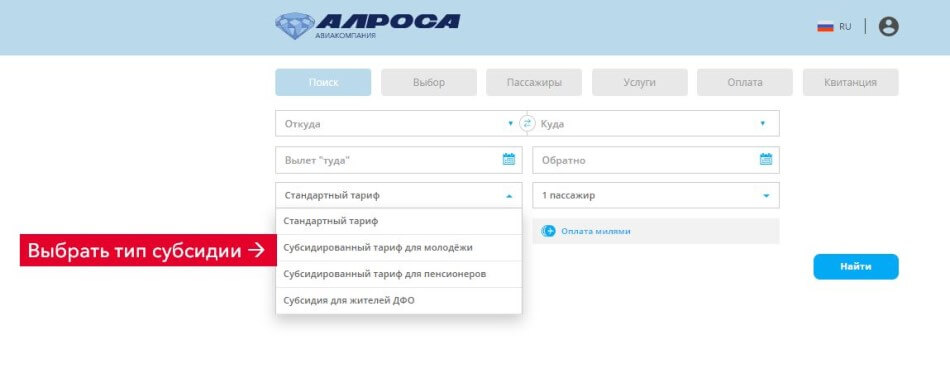
The purchase procedure is almost no different from the usual registration of an air ticket on the website. At the first stage of the air ticket search, in addition to choosing the direction and date of the flight, you will also need to select the required subsidy category.
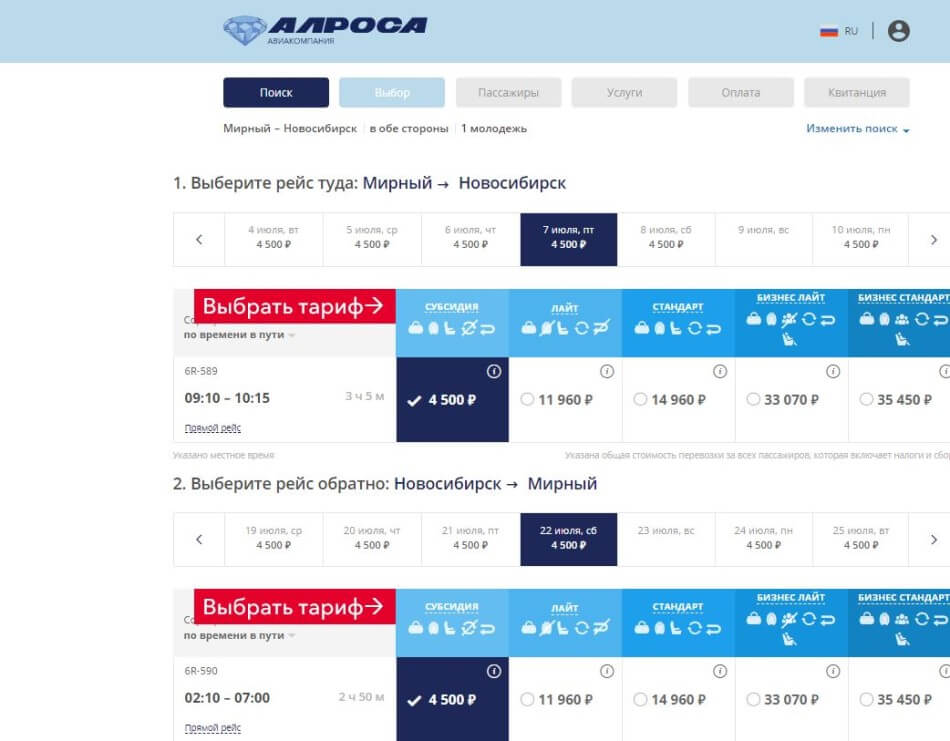
At the second stage, you must confirm the choice of tariff one by one. The name of the fare will tell you which fare to choose.
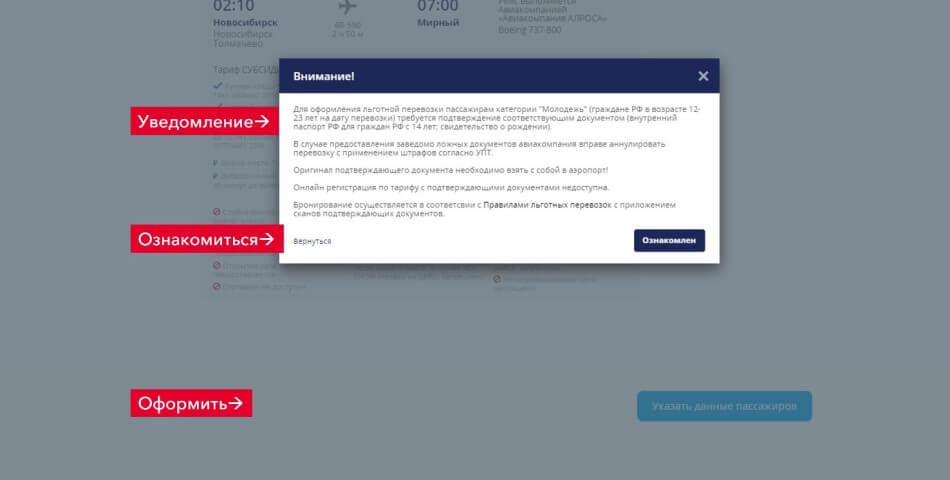
After that, as usual, you will proceed to entering the passenger data. But before that, the system will ask you to read the notification.
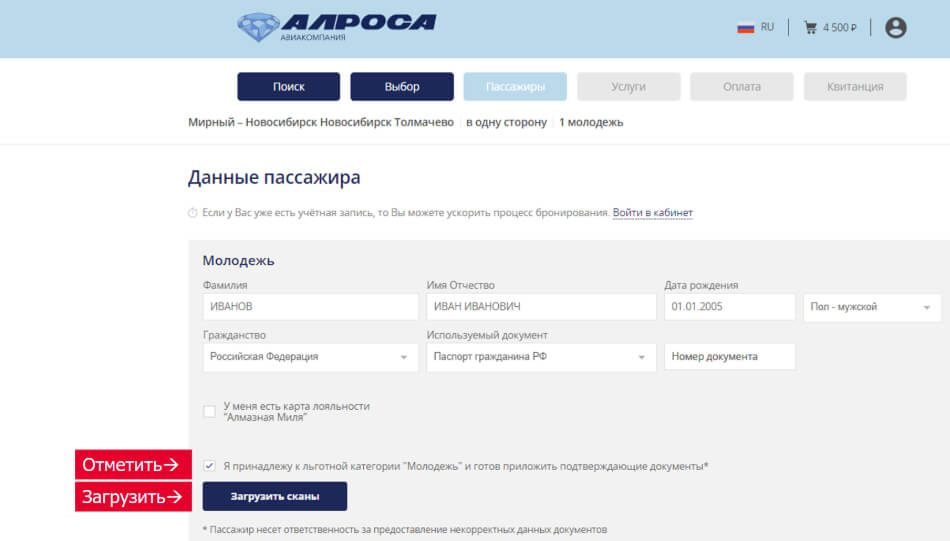
At the data entry stage, you will need to tick the box and confirm your right to the benefit. Next, you should upload a scan of the document (scan of the passport or scan of the birth certificate for passengers from 12 to 14 years old). After clicking the upload button, a notification window with simple and clear instructions will appear again. Please attach a scan of the document that you indicate when issuing the ticket. Each subsidized ticket undergoes a mandatory check. ATTENTION: In the "Name Patronymic" field, it is necessary to enter both the Name and Patronymic. Patronymic is not indicated only if it is not in the passenger's passport. Please note that the booking may be cancelled if the attached documents do not meet the requirements of the preferential fare or the data specified in the booking.
If the file format or its size does not comply with the upload rules, a corresponding preview appears Warning. If all the data in the form is filled in correctly, but the file is not uploaded, the button to proceed to the next step is inactive. After uploading the scans and entering the data, you proceed to the next stages of transportation registration, which completely coincide with the usual booking procedure on the website.
How to pay for a subsidized ticket
If the ticket is issued under the Far Eastern Federal District subsidy: After selecting additional services, the system makes a reservation. Once the flight has been booked, the passenger will receive a notification email to the specified email address about the creation of the booking, which states that the booking is being checked and may be cancelled if the data specified during the booking does not match the attached documents entitling them to the discounted fare. After checking the attached scanned documents, if the documents are in order, the airline will confirm the booking. The passenger will receive an email to the specified email address with instructions on how to pay for the booking. The booking may be cancelled if the attached documents do not match the requirements of the discounted fare or the data specified in the booking.
If the transportation is arranged within the framework of the age subsidy: After the user selects additional services, the system makes a booking. When the user goes to the payment page, he will no longer be able to make changes to the list of attached documents. After paying for the booking, the user will receive a notification letter to the email specified during the booking about the creation of the booking, which indicates that the booking is under verification and can be canceled if the attached documents do not meet the requirements of the preferential rate or the data specified in the booking.
Detailed information on available subsidized transportation programs, limits on the number of transportations, as well as full instructions on how to apply for subsidized transportation on the website are published in a special section of the website Subsidized transportation.
 English
 Русский